WordPress publish a post from frontend without plugin
How to publish a post from frontend without plugin in wordpress? This is not a complex task and users can publish their own post without using a plugin.Post fields validations, error displaying and bootstrap html contents added and you have only add bootstrap css files.
Step-1 : Creating Template page
I’m going to create a template page and it assign into a page to display the form.My theme is twentytwelve.
wp-content/themes/twentytwelve/page-templates/
1-Create a page.Named it as you wish. I’ll name it front-end-post.php.
2-Add the following code into it and save.
Step-2 : Assign the Template page into frontend page
Go to the admin panel and create a page to display the form.Then select the “Template” from right side drop down box.
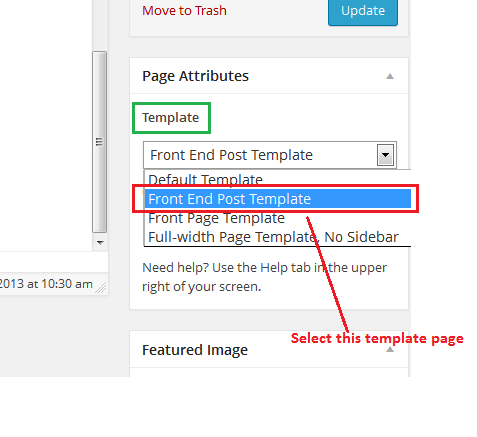
Step-3 : Creating the form
Step-4 : Submit form process
	$postTitleError = '';
	$postContentError = '';
	if( 'POST' == $_SERVER['REQUEST_METHOD'] && !empty( $_POST['action'] ) &&  $_POST['action'] == "frontnewPost") {
		if ( trim( $_POST['postTitle'] ) === '' ) {
			$postTitleError = 'Please enter a title.';
			$hasError = true;
		}
		if ( trim( $_POST['postContent'] ) === '' ) {
			$postContentError = 'Please enter the post content.';
			$hasError = true;
		}
		if (isset ($_POST['postTitle'])) {
	        $postTitle =  $_POST['postTitle'];
	    }
	    if (isset ($_POST['postContent'])) {
	        $postContent = $_POST['postContent'];
	    }
		if ( isset($_POST['postTitle']) && isset($_POST['postContent']) && ( $hasError==false )) {
			$postTags = trim($_POST['postTags']);
			global $wpdb;
	    	$new_post = array(
		    'post_title'    =>   $postTitle,
		    'post_content'  =>   $postContent,
	    	'post_category' =>   $_POST['cat'],//array($_POST['cat']), // if specific category, then set it's id like: array(4),
		    'tags_input'    =>   array($postTags),
	    	'post_status'   =>   'publish',
		    'post_type' =>   'post'
		    );
 	    	$post_id = wp_insert_post($new_post);
 	    	wp_set_post_tags($post_id, $_POST['postTags']);
 	    	$link = get_permalink( $post_id );
			echo ""; exit;
		}
		}
Step-5 : Display the error message
Put this all together
$postTitle, 'post_content' => $postContent, 'post_category' => $_POST['cat'],//array($_POST['cat']), // if specific category, then set it's id like: array(4), 'tags_input' => array($postTags), 'post_status' => 'publish', 'post_type' => 'post' ); $post_id = wp_insert_post($new_post); wp_set_post_tags($post_id, $_POST['postTags']); $link = get_permalink( $post_id ); echo ""; exit; } } ?>
How to add Featured Image
require_once(ABSPATH . 'wp-admin/includes/media.php');
require_once(ABSPATH . 'wp-admin/includes/file.php');
require_once(ABSPATH . 'wp-admin/includes/image.php');
// example image
$image = 'http://example.com/logo.png';
// magic sideload image returns an HTML image, not an ID
$media = media_sideload_image($image, $post_id);
// therefore we must find it so we can set it as featured ID
if(!empty($media) && !is_wp_error($media)){
    $args = array(
        'post_type' => 'attachment',
        'posts_per_page' => -1,
        'post_status' => 'any',
        'post_parent' => $post_id
    );
    // reference new image to set as featured
    $attachments = get_posts($args);
    if(isset($attachments) && is_array($attachments)){
        foreach($attachments as $attachment){
            // grab source of full size images (so no 300x150 nonsense in path)
            $image = wp_get_attachment_image_src($attachment->ID, 'full');
            // determine if in the $media image we created, the string of the URL exists
            if(strpos($media, $image[0]) !== false){
                // if so, we found our image. set it as thumbnail
                set_post_thumbnail($post_id, $attachment->ID);
                // only want one image
                break;
            }
        }
    }
}
What's your reaction?
Excited
0
Happy
0
In Love
0
Not Sure
0
Silly
0